Releases

October 8, 2026

Page setup, code node, and more

Pageless width, page view numbers, margins and page colors: build your document the way it should look. And that’s just part of the update.

October 8, 2026

Page setup, code node, and more

Hey there!

Page setup settings

Some documents are for reading on screen. Others — contracts, reports, manuscripts — need to look like real pages. Page setup lets you choose, document by document.

Open the document menu and choose Page setup. Pageless keeps one continuous flow of text, and you pick its line width — from a narrow 560 to a wide 960. Page view splits the document into pages, the way it will look when printed or exported.

In Page view, turn on page numbers and choose where they sit and how they read: 1, 1 of 10, Page 1 or Page 1 of 10. Hide the number on the first page if it’s a title page.

Set the top, bottom, left and right margins, and give the pages a color if you like.

When you share a document to the web, it keeps its pages, numbers and margins — in both light and dark themes.

Introducing code blocks

Strokes now supports code blocks. It detects pieces of code in your text automatically and highlights syntax for over 20 programming languages.

A TypeScript code block with syntax highlighting, a language picker and a copy button

Inline link edits

Hover over a link in the editor to see where it goes, and edit it right there — no format bar needed.

A link in the editor with a small popover showing its address and an Edit button

More updates coming soon! Cheers, Vagan

October 5, 2026

Editor defaults and version history

Set up the editor the way you like it once — for every document. And go back to any earlier version of your document.

October 5, 2026

Editor defaults and version history

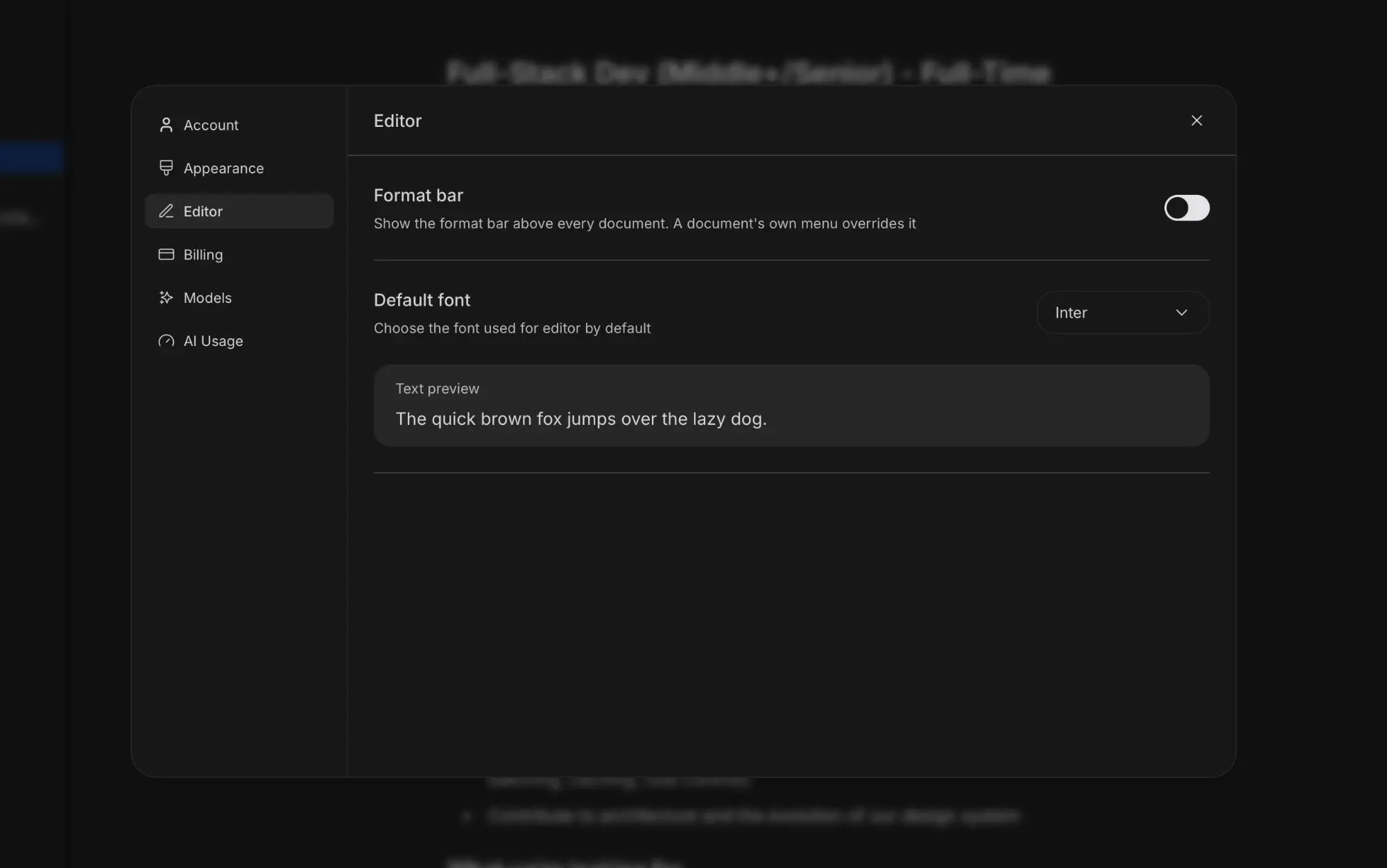
Strokes Editor settings with the Format bar and Default font options

Hey there!

This week’s update is about two things: spending less time setting up the editor, and never losing a good draft.

Editor defaults

Settings now has an Editor section. Choose whether the format bar shows above every document and which font the editor uses by default, with a live text preview.

Need something different for one document? Its own menu still has the Format bar toggle, and it overrides the default.

Version history

Strokes now keeps versions of your documents as you write. Open the document menu and choose Version history to see them all in a side panel, from the current version back to the very first one.

Version history panel listing the current version and earlier saved versions

Pick any version to preview it with the changes marked — what was added and what was removed. If you like it more than what you have now, restore it in one click.

Versions are saved automatically, but you can also save one yourself with the + button before a big rewrite. Switch to Manual to see only the versions you saved.

As always, I’d be glad to hear your feedback. Cheers, Vagan

September 30, 2026

Strokes launch

Strokes is now open to everyone. Try it free today and be among the first to shape what it becomes.

September 30, 2026

Strokes launch

Hey there!

Today I’m thrilled to announce that Strokes, the product I’ve loved building most, is entering public release. For the last month we’ve been testing it with my close friends — fellow creators.

The idea of Strokes came to me when I realized that the way I write code is much more pleasurable for me than the way I write articles or work on docs. When I code, I just open my IDE and start coding. Whether I have the internet or not. I have everything I need in one place — built-in access to all modern LLM models, any file I’m working on, and much more.

Why don’t we have such an integrated environment for creators? The current way we use AI to work with text is full of friction. If it’s something big, like a book, it’s even worse.

With Strokes, I believe creators can focus their attention on creativity and not on jumping from one browser window to another.

We’re not trying to remove the creativity from the work we do. But removing all that friction and the mind-numbing parts of the process to make our work more fun and rewarding? That sounds pretty great.

Now it’s time to open the doors and share Strokes with people I don’t know personally. We still need to identify which bottlenecks we need to fix, so I would be glad to hear your feedback.

Cheers, Vagan

The AI-native editor built for creativity, content, and work